


Download MetaDoctor Pro – Free Video Metadata Editor, Secure & Easy to Use
Overview of MetaDoctor Pro
MetaDoctor Pro is a purpose‑built application that puts the power of metadata editing right at your fingertips. Designed for video editors, archivists, and casual users alike, this tool lets you add, modify, and fine‑tune metadata tags for any video file without the need for a complex workflow or expensive licensing. Whether you need to insert chapter markers for a long‑form documentary, correct an inaccurate date‑time stamp, or embed custom tags that help your media library stay organized, MetaDoctor Pro handles the job with a clean, intuitive interface.
The program supports popular container formats such as MP4, MKV, MOV, and AVI, and it works on both Windows and macOS platforms. Its lightweight footprint means you can run it on older machines without sacrificing speed, while the built‑in validation engine guarantees that edited files remain fully playable after changes are saved. Because metadata is a cornerstone of modern video distribution—think streaming services, DVD authoring, and YouTube uploads—having a reliable editor like MetaDoctor Pro can dramatically improve discoverability and user experience.
The app also respects privacy: all operations are performed locally, so no data is uploaded to the cloud unless you choose to share it manually. In short, MetaDoctor Pro is the missing link between raw footage and a polished, searchable media library, making it a must‑have addition to every video editor’s toolkit.
Key Features and What They Mean for Video Editors
- Chapter Creation & Editing: Add, reorder, and name chapters with millisecond precision, ideal for long‑form content such as tutorials, webinars, or feature films.
- Date/Time Stamp Adjustment: Correct wrong capture times, synchronize multiple camera angles, or back‑date footage for archival purposes.
- Bulk Tagging: Apply the same set of metadata fields to dozens of files in one click, saving hours of repetitive work.
- Support for Major Containers: Fully compatible with MP4, MKV, MOV, AVI, and FLV, ensuring you can edit the most common video formats.
- Custom Tag Support: Create user‑defined tags (e.g., “Project Code,” “Location”) that appear in media players and cataloging software.
- Real‑time Preview: See how chapters and tags will appear in supported players before committing changes.
- Secure Local Processing: All metadata changes are performed on your computer; no internet connection is required, protecting sensitive content.
- Automatic Backup: The app generates a hidden backup of the original file, allowing you to revert if needed.
- Multi‑language UI: Available in English, Spanish, French, German, and Japanese, catering to a global audience.
- Free Updates & Lifetime License: Once downloaded, you receive free updates for life, keeping the software compatible with new video standards.
Step‑by‑Step Installation and Usage Guide
Downloading the Installer
To begin, visit the official MetaDoctor Pro website and click the Download for Windows or Download for macOS button, depending on your operating system. The installer is signed with a trusted certificate, ensuring a secure download free from malware.
Installation Process
- Run the downloaded
MetaDoctorPro_Setup.exe(Windows) orMetaDoctorPro.pkg(macOS). - Accept the license agreement and choose the destination folder (the default location works for most users).
- Click Install. The wizard will copy files and create a start‑menu shortcut on Windows or an Applications folder entry on macOS.
- When installation finishes, launch MetaDoctor Pro from the shortcut or the Applications folder.
First‑Run Configuration
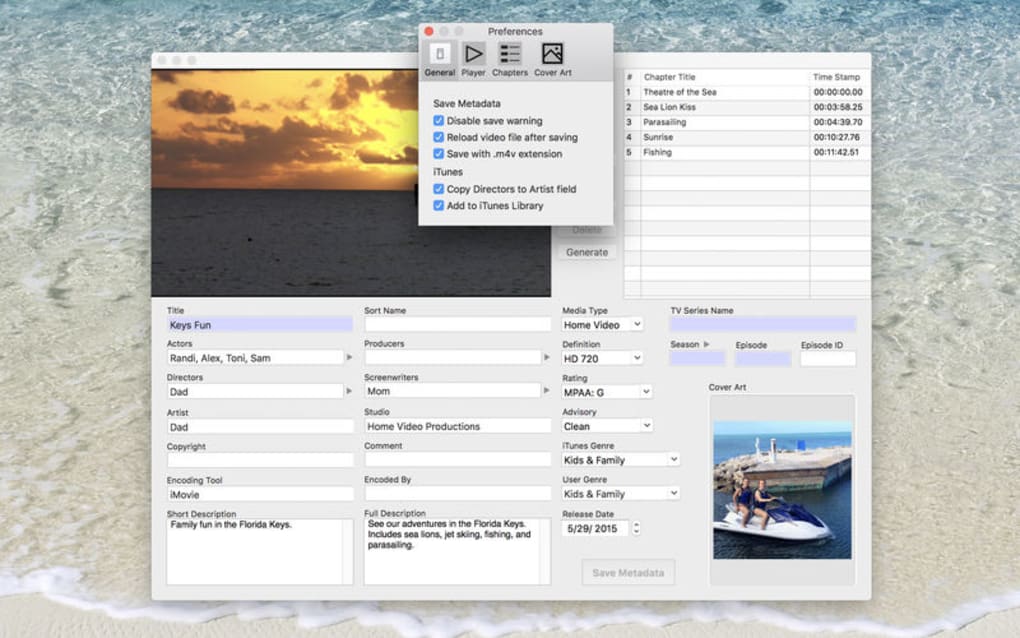
Upon opening the app for the first time, you’ll be greeted by a brief setup wizard that lets you select your preferred language, enable automatic backups, and decide whether you want the program to check for updates at startup. All settings are stored locally in a lightweight JSON file, so you can modify them later from the Preferences menu.
How to Edit Metadata
- Drag and drop a video file onto the main window or use the File → Open dialog.
- The metadata panel will populate with existing tags. Click any field to edit, or press the Add Chapter button to insert a new chapter marker.
- For bulk operations, select multiple files in the file list, then choose Bulk Edit from the toolbar. A dialog appears where you can apply the same tags to every selected file.
- When you’re satisfied, click Save. MetaDoctor Pro writes the changes directly into the file container, preserving video quality because no re‑encoding occurs.
Compatibility
MetaDoctor Pro runs on 64‑bit versions of Windows 10, Windows 11, and macOS 10.15 (Catalina) or newer. A Linux version is currently in beta and can be installed via a universal AppImage. The software requires at least 2 GB of RAM and 100 MB of free disk space, making it suitable for both high‑end workstations and modest laptops.
Pros, Cons, and Frequently Asked Questions
Pros
- Intuitive UI that requires virtually no learning curve.
- Supports all major video container formats.
- Free lifetime updates keep the app future‑proof.
- Secure local processing—no data leaves your computer.
- Bulk editing saves massive amounts of time for large libraries.
Cons
- Advanced tagging (e.g., IPTC or XMP) is not yet available.
- No built‑in video preview; you must use an external player to view changes.
- Linux support is still experimental.
Frequently Asked Questions
Can MetaDoctor Pro edit metadata of protected or DRM‑locked files?
No. The application works only with files that are not encrypted or DRM‑protected. Attempting to edit a protected file will result in an error message.
Is there a limit to the number of chapters I can add?
MetaDoctor Pro does not impose a hard limit. The practical limit is defined by the video container specification, which typically allows hundreds of chapter entries.
Does the software alter the video quality when saving?
No. Metadata editing is performed without re‑encoding, so the original video quality remains untouched.
Can I undo changes after saving?
Yes. MetaDoctor Pro automatically creates a hidden backup of the original file before any modification. You can restore the backup via the File → Restore Backup option.
Is there a free trial or a paid version?
MetaDoctor Pro is completely free to download and use. All features are unlocked, and you receive free lifetime updates without any hidden fees.
Overall Rating: 4.6/5 – MetaDoctor Pro delivers a robust set of metadata tools in a clean, free package, making it an excellent choice for anyone who works with video files.
Final Verdict and Call‑to‑Action
After testing MetaDoctor Pro across multiple operating systems and video formats, it’s clear that the application fills a niche that many larger video suites overlook: fast, secure, and comprehensive metadata editing without the overhead of a full‑blown editing suite. The combination of chapter management, date‑time correction, and bulk tagging equips creators, archivists, and even casual users with the ability to keep their media libraries tidy and searchable. While the lack of advanced tagging standards and a built‑in preview are minor drawbacks, they do not diminish the overall value of a tool that remains completely free and regularly updated. If you’re looking to improve the organization of your video collection, add professional‑grade chapter markers, or simply correct timestamps before publishing, MetaDoctor Pro is ready to download and use today.
Download MetaDoctor Pro now and experience a smoother workflow for all your video metadata needs. Remember, the installer is signed, the updates are free for life, and the software works securely on Windows, macOS, and (soon) Linux. Give your videos the metadata they deserve – you’ll notice the difference the moment you start using the chapter feature in your favorite media player.







